
Adding Communication Modes
The Communication Modes screen allows you to define the methods through which feedback may be received and sent.
-
Click .
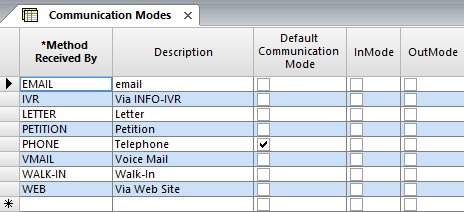
The Communication mode screen appears.
-
Click the Add New button:

- In the Method Received By field of the new row, type an abbreviation to identify the communications mode.
- In the Description field, type a description of the mode of communication.
- Optional: To specify the mode as the default, select the Default Communication Mode checkbox.
- To select a mode as either incoming or outgoing, select the InMode and/or OutMode checkbox.
- Optional: To mark the communication mode as inactive, select the Inactive checkbox. Only active Communications Modes are shown in the Required Response Method dropdown lists in the COM Representative and COM Investigator screens. In the Context dialog of the COM Investigator screen, all communication mode are shown and can be selected in the Com. Mode dropdown list.
-
Click the Save button :
