Feedback by Mode Report
The Feedback by Mode report provides information on the feedback received classified by transportation mode as mentioned in the feedback received within the selected date range.
Parameters
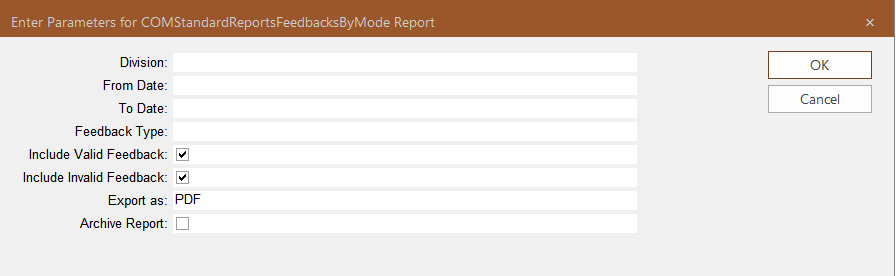
| Parameters | Description |
|---|---|
| Division | List of divisions involved in resolving issues raised in customer feedback. |
| From Date | Start date of the time period covered in the report. |
| To Date | End date of the time period covered in the report. |
| Feedback Type |
Feedback type included in the report. |
| Include Valid Feedback | If selected, only feedback with the selected Feedback subtype that is marked valid in the COM Investigator or COM Representative screen is included in the report. |
| Include Invalid Feedback |
If selected, only feedback with the selected Feedback subtype that is not marked valid in the COM Investigator or COM Representative screen is included in the report. Checking both Include Valid Feedback and Include Invalid Feedback options means that all feedback with the selected feedback subtype will be included in the report. |
| Export as | Format type of the report when exported – The options are:
|
| Archive Report | If selected, a copy of the report is saved so it can be later viewed in the Report Archive module. |
Sample Report
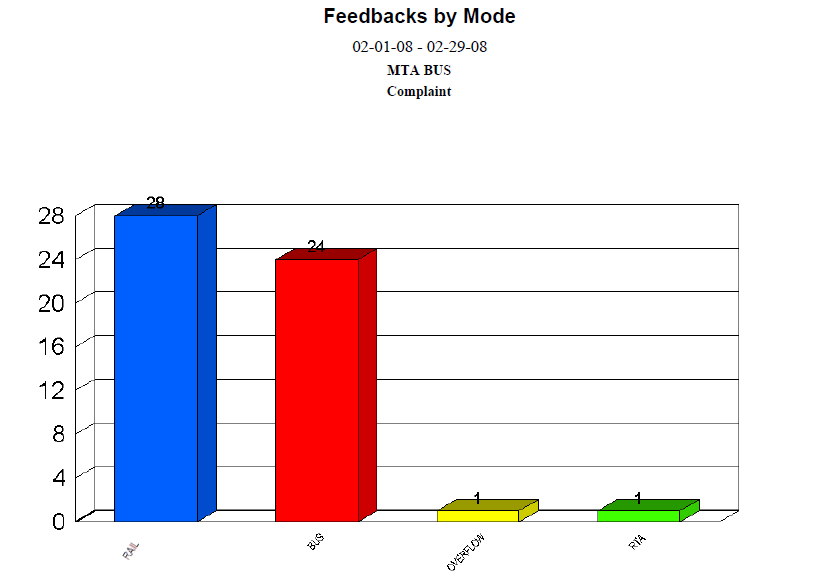
The report shows a bar chart with each bar representing a transportation mode.
The following example shows the Complaints feedback received grouped by transportation mode, with Rail receiving the most number of complaints during the specified date range: