
Setting up the CTM Server
A CTM Server must be set up on a machine that has network access (communicates with database server and Hiwire server).
-
In the Trapeze4 Bin directory, double-click the file, CTMSrv41.exe.
The CTMSrv [Server name] dialog is displayed.
-
Click .
The CTMSrv Configuration dialog is displayed.
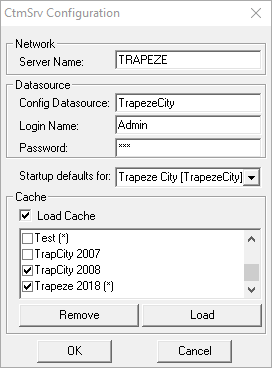
- In the Server Name field, type the name of the CTM Server.
-
In the Config Datasource field, type the configuration data
source.
The CTM Server name must match the CTM Server name specified in the Trapeze4 profile.
- Click OK.
- Click .
-
Double-click the file, CtmSrv14.exe again.
The server begins processing. A log file showing the server activity also appears on your task bar.
The available sign-up periods are shown. The CTM Server requires the sign-up period to be flagged as Production.
An asterisk (*) is shown if it is not a production sign-up period.
The Cache can be loaded for the desired sign-up periods from the server or a workstation (Loading from server is recommended only in production environments.).