
Setting Up Alerts
Alerts can be added for specific types of dashboard content.
-
On a Dashboard tile, select .
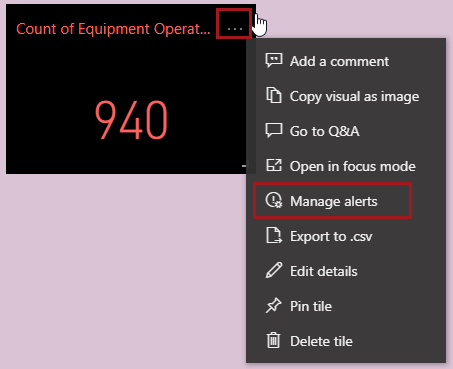
The Manage alerts pane appears. - Select + Add alert rule.
- Turn on the Active toggle.
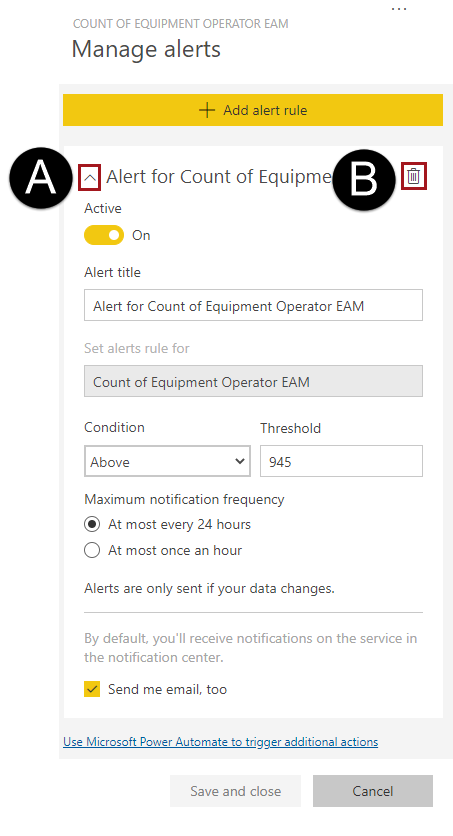
- Enter an Alert title, select a Condition, and enter a Threshold.
-
Select a Maximum notification frequency and choose
whether or not to also receive an email.
When alerts are sent, they are available in the Notifications Center.
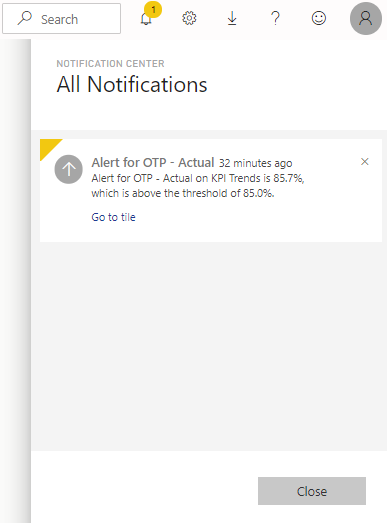
If an email was requested, it is sent to your inbox.
Attention: Do not use the Go to dashboard link in notification emails to access ViewPoint. It defaults to a generic instance of Power BI and will not find the correct dashboard. -
To edit or delete alerts, do one of the following:
- On the dashboard tile showing the alert to be updated, select . Expand the alert and make any updates or delete the alert
rule.
- On the Title bar, select the Settings button,
select Settings and then the
Alerts tab. For the alert, update the
On toggle or select Edit
or Delete.

- On the dashboard tile showing the alert to be updated, select . Expand the alert and make any updates or delete the alert
rule.