
Configuring DriverMate - VoIP
To enable voice calls on your DriverMate tablet, you must configure the VoIP settings with the SIP account information of the device.
About this task
Procedure
-
On the DriverMate login screen, tap the DriverMate logo on the upper section of
the screen three times in rapid succession.
The Status screen is shown.
- Tap the three vertical dots on the upper right corner of the screen, and select Admin.
- Enter your Admin password (636867 is the default.)
-
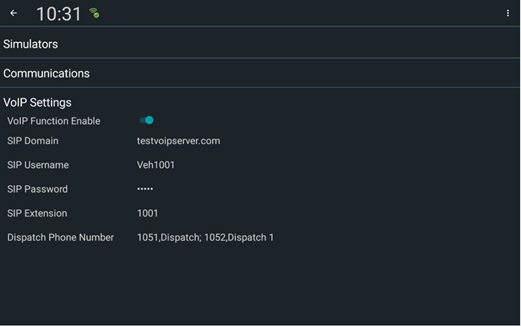
Tap VoIP Settings.
The VoIP Settings fields are shown.
-
Enter the appropriate values in the VoIP Settings
fields. The following image shows sample values in the various fields:
- To save and close the settings, tap the Back (leftward) button on the upper left corner of the screen.
- To close the Status screen, tap the Back (leftward) button again.