
Adding Timed Connections
When necessary, you can add timed connections at common nodes or at nodes on one line that are near other lines.
Procedure
- With the Trip Building screen open, click . The Timed Connections dialog box appears.
-
Click Add.
The Add Timed Connection dialog box appears.
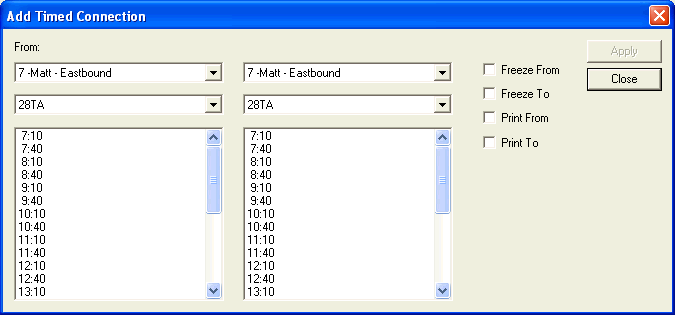
- In the From direction list, select the direction from which the transfer trip occurs.
- In the From node list, select the node at which the timed connection occurs.
- In the list of trip times shown on the lower left frame, select the appropriate time.
- In the To direction list, select the direction of the trip to which the trip is expected to connect.
- In the To node list, select the node at which the timed connection occurs.
- In the list of trip times on the lower right frame, select the appropriate time.
- Optional:
Perform the following steps, if required:
-
To freeze the timed connection, select the Freeze From and Freeze To check boxes.
-
To print the timed connections, select the Print From and Print To check boxes.
-
- Click Apply.
- Click Close.