
Creating Daily Runs
When you have more clients requesting trips than usual, you can create a new run to be added to a daily run list.
Before you begin
About this task
Procedure
- Click the Daily option.
-
In the Schedule field, click the ellipsis button
(…).
The Select Schedule dialog box appears.
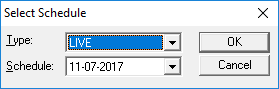
- In the Type field list, click Live.
- In the Schedule list, click the date for which you want the run to be added.
- Click OK.
- Click the Add New button:
 The Detail tab opens.