Adding Client Co-Payments to Period Passes
Client co-payments can be defined for each period assigned to a period pass.
About this task
For example, if a client's fare type takes them from one polygon to another polygon they may be required to pay more than what's covered by the period pass.
Procedure
- Click .
- From the list on the left side of the dialog box, select a Period Pass.
- From the list on the right side, select a Period Name.
-
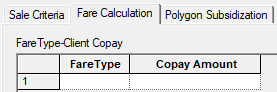
In the lower section of the dialog box, click the Fare
Calculation tab.
-
In the first available row, click in the Fare Type column, and
select a fare type.
Note: This functionality is only available if you have Trapeze4 on your main computer screen. If the application is used on a secondary computer screen, the first option in the list is selected automatically or no options are suggested.Fare Types are defined in ancillary data.
- In the Copay Amount column, type the co-pay amount.
- Click Save.
- Optional: To delete a client co-payment, click on the row number to be deleted and press the Delete key on the keyboard. You will need to add the FareType and Copay Amount before the row can be deleted.
What to do next