The MDT Center automatically appears when new notifications arrive from the mobile
computers when pop-up mode is enabled.
Before you begin
MDT Center must be open.
About this task
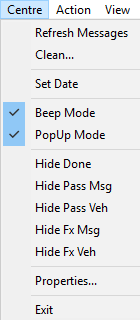
Pop-up mode is selected by default. This allows the system user to deal with MDT
messages immediately. If this is not needed, pop-up mode can be disabled. For example, when a
dispatcher is on scheduling duty for a shift and does not need to address the
notifications.
Procedure
Click .
The check mark beside the option is removed.
What to do next
To re-enable pop-up mode, click the option again.