About Shifts
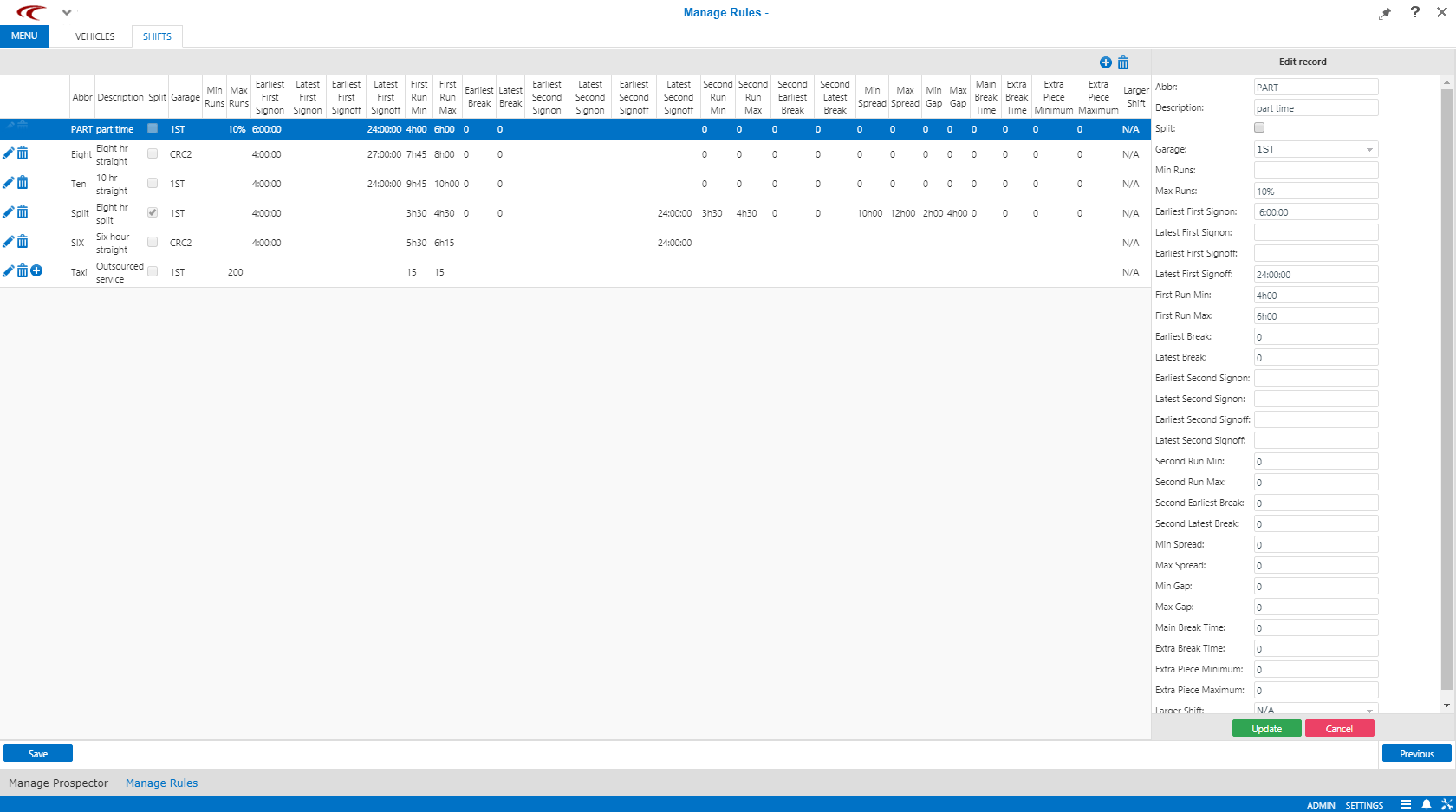
The Shifts dialog box allows you to define the allowable parameters of each type of driver shift that you are allowed to put on the street.
On each line, you can name a duty, give it an abbreviation to be used, declare whether or not it is a split shift (more than one run), and, if desired, declare a maximum permitted number of such shifts.
- A straight run with no break
- A straight run with a main meal break
- A straight run with a main meal break and a secondary break before the main break
- A straight run with a main meal break and a secondary break after the main break
- A straight run with a main meal break and a secondary break both before and after the main break
- A split (broken) shift with two runs and no breaks in either run
- A split (broken) shift with two runs and one break in the first run
- A split (broken) shift with two runs and one break in the second run
- A split (broken) shift with two runs and a break in both runs
A shift is what a driver does in a day. A shift is considered a straight if it has one run. It is considered a split or broken (two terms used interchangeably) if it consists of two runs.
A break is rest time for the driver during a run.
As an example, the following is a diagram of a split shift with breaks in both the morning and afternoon runs.
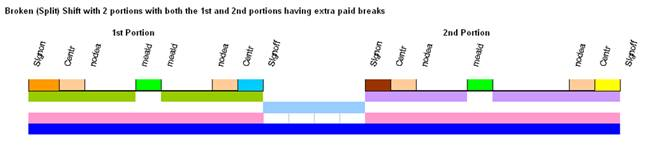
- Signon to Centr
- This corresponds with the report time in PASS.
Typically, this is zero.
- Centr to nodea
- This corresponds with the time it takes a driver to deadhead from the (Centr) garage
to a point in time where the vehicle is ready to begin revenue service.
Typically, this deadhead time is zero.
- Nodea to meald
- This is revenue service.
- Meald to Meald
- This is a meal break.
- Meald to nodea
- This is revenue service.
- Nodea to Centr
- This is deadheading out of revenue service.
Typically, this is zero.
Note that deadheading on a live PASS run should not be entered as deadhead in ParaCutter unless the vehicle is unavailable for revenue service during that time period.
- Centr to Signoff
- This is clear time in PASS.
Typically, this is zero.
- If you specify a meal break, it is assumed to be mandatory and paid.
- Gaps between runs on a split shift are assumed to be unpaid.
- Split shifts can include a maximum of two runs.
- If the run is a straight, the break is entered as a main break. Two runs must be entered for the shift. One represents the portion of work before the break and the other represents the portion after the break.
- If the shift is a split and it should always be on the morning run,
Earliest Break and Break Latest must be
entered on the first run.
Second Earliest Break and Second Latest Break need to be filled in if the break must be on the afternoon run.
All four values must be filled in if both morning and afternoon runs require a break.
ParaCutter does not currently support a single break that could be placed on either the morning or afternoon run of a split.
Some parameters are optional with any shift type.
- Earliest and latest sign-on and sign-off values may be used to force constraints on
the start or end time of a certain type of shift, if desired.
For example, a certain type of shift could be defined as starting exactly at 9:30 in the morning by setting 9:30 as both the earliest and the latest sign-on.
- Minimum and/or maximum runs can be specified for any shift type.
The entry may be a number (for example, 7) or it could be a percent (for example, 10%). Make sure that if both minimum and maximum values are defined that the minimum is less than or equal to the maximum. If you set them as equal, this tells the runcutter that you want exactly that number of shifts of this type.
With this as background, the following section describes what you must enter in the Shifts step for each of the nine supported shift types. Accompanying each case is a diagram showing color codes and terms used by ParaCutter.
Trapeze does not recommend using the following shifts types: a straight run with a main meal break and a secondary break before the main break or a straight run with a main meal break and a secondary break after the main break. Trying to anticipate the timing of secondary breaks in a seasonal runcut is excessive. If you are just getting started, Trapeze recommends using a straight run with no break or a split (broken) shift with two runs and no breaks in either run.