
Generating Extra Pieces of Work
You can generate extra pieces of work from excess amounts of paid breaks and makeup time as well as for selected runs.
Open the Runs screen.
-
On the screen toolbar, click the Generate Extra Piece
button:
 The Generate Extra Pieces dialog appears.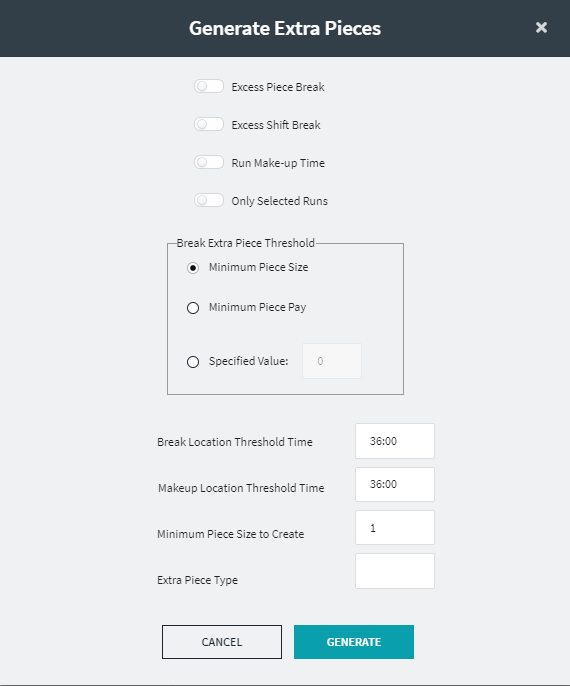
-
Select any of the following options:
-
Excess Piece Break: If toggle is turned on, extra pieces of work are created from the excess time of an operator’s piece break.
-
Excess Shift Break: If toggle is turned on, extra pieces of work are created from the excess time of an operator’s shift break.
-
Run Makeup Time: If toggle is turned on, extra pieces of work are created from an operator’s excess makeup time.
- Only Selected Runs: IF toggle is turned on, extra pieces of work are created for selected runs only.
-
-
In the Break Extra Piece Threshold frame, choose one of
the following options:
- Minimum Piece Size - If selected, extra pieces of work are created only if the break is greater than the Minimum (Piece or Shift) Break Time (for the run type of the run) This is selected by default.
- Minimum Piece Pay- If selected, extra pieces of work are created only if the break is greater than the (Piece or Shift) Break Pay Lower Threshold (for the run type of the run).
- Specified Value - If selected, extra pieces of work are created only if the break is greater than the specified value.
-
In the Break Location Threshold Time field, enter the
time where the extra piece will be located.
If the sign-off time of the piece before the break is greater than this value, the extra piece will be added at the start of the break, otherwise, at the end of the break. (This applies to Excess Piece Break and Excess Shift Break only.)
-
In the Makeup Location Threshold Time field, enter the
time where the extra piece based on the Makeup time will be located.
If the run sign-off time is greater than this value, the extra piece will be added before the first piece, otherwise after the last piece. (This applies to the run's Makeup Time only.)
-
In the Minimum Piece Size to Create field, enter minimum
size of the extra piece required.
Do not create an extra piece if it will be smaller than this value.
- In the Extra Piece Type field, enter the extra piece type, which will be assigned to the extra piece.
- Click Generate.