
Cleaning up BSM Data
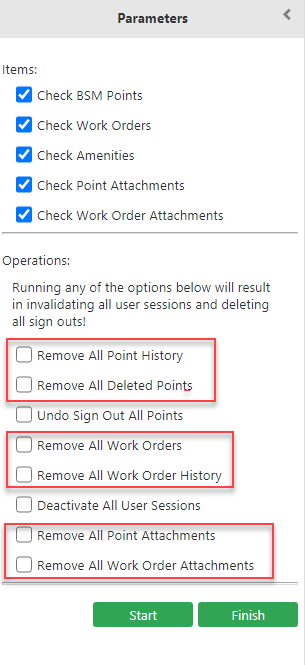
In the Integrity Checking screen, the Operations frame of the Parameters pane allows you to perform tasks that help to clean up the BSM data.
- Click Settings, and then click Integrity Check in the Admin list.
-
In the Operations frame of the Parameters
pane, select the appropriate check box:
- Remove All Point History - Data on the changes made to all points.
- Remove All Deleted Points - Data on all deleted points.
- Remove All Work Orders - Data on all work orders.
- Remove All Work Orders History - Data on the changes made to all work orders.
- Remove All Point Attachments - All files that have been attached to point records.
- Remove All Work Order Attachments - All files that have been
attached to work orders.
- Click Start.