
Deleting Garages
You can remove garage records that you no longer require.
- On the Select tab, select the garage.
-
Click the Delete button:

A warning message asks you to confirm the action if no other data is associated with the garage.
-
Click Yes.
If there is data associated with the garage however, a message similar to the following example is displayed:
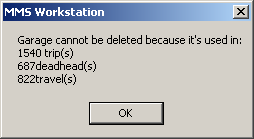
- Click OK. You are prevented from deleting these garages.