
About Adjusting Polygon Layer Settings
You can customize the appearance of your polygons by adjusting the Threshold, Indexing, and Style Override settings in the Layer Control dialog.
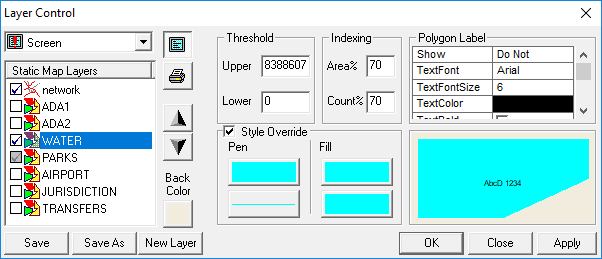
Threshold

When both map span values (E-W and N-S) are greater (achieved by zooming out) than the upper threshold value set for a given polygon, the polygon is no longer visible. The same is true for the lower threshold, where if the map span values are less than the lower threshold (achieved by zooming in), the polygon disappears.
Indexing
- Point-in polygon queries
- Polygon display
To take advantage of these mechanisms, the polygon map data needs to be indexed for the selected polygon type by using the Build tool in either MapMaker or MapEdit. For more information on these products, contact your Trapeze representative.
Under certain circumstances, the cost of using indexes may outweigh the benefits. For example, if you are looking at almost the entire area covered by the certain polygon type, or almost all of the polygons of that polygon type, it is likely faster to consider all of the polygons rather than use the indexing mechanism.