Changing the Layout of Address Boxes
You can change the layout of all address boxes or individual address boxes.
If you are not sure what information is required in an address field, move the mouse pointer over it. A tooltip appears showing the name of the field.
-
Change the default address box setting:
- Click .
- Click the Formats tab.
- Click .
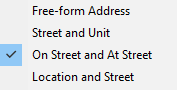
- Select the preferred Address Layout.
- Click OK.
-
Change the layout on a specific address box:
- Right-click on the address box.
-
Select the address layout to use.