
Geocoding Addresses with Multiple Matches
If the address you want to geocode exists in more than one city, the Address Matcher dialog box opens with a list of possible matches.
Using the example of 123 Man as the street address, the Address Matcher dialog box provides a list of possible matches.
The grid at the bottom of the Address Matcher dialog box shows twenty-eight possible matches. Since the City was not specified, the results indicate that the address exists in more than one city.
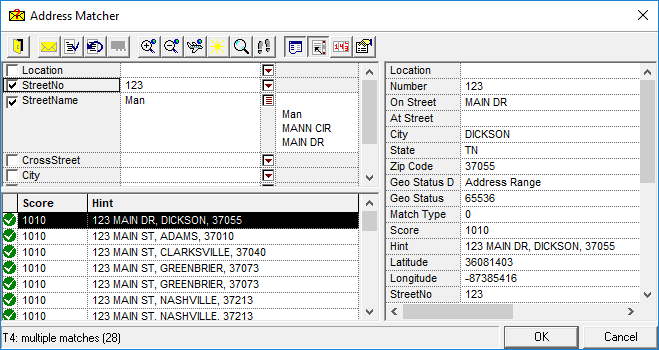
Results with green check marks are exact matches for the data entered. For example, 123 Main may be considered an exact match for 123 Man because of the Soundex algorithm.
If a result shows a red exclamation mark, it is considered a close but not an exact match to the requested address.
If an address has multiple matches:
- In the bottom grid of the Address Matcher dialog box, highlight the best match.
- Click OK.