
Comparing Demographic Analysis Results

You can compare demographic analyses with demand forecasts.

  1. In the PLAN Options dialog box, select the geographic area for analysis, create buffers around the area of interest, and perform the first demographic analysis.
  2. After the analysis, close the PLAN Options dialog box.
  3. Click Analysis > Save Current Demand Forecast.
    The results of the first analysis are saved temporarily.
  4. Do one of the following: steps
    • Click Analysis > Clear All.
    • Click Clear All: Clear All button
  5. For the second analysis, repeat step 1 for the second demographic analysis.
  6. In the Summary tab in the Spatial Analysis screen, view the results of the second analysis of the geographical area (current demand forecast), the results of the first analysis (the saved demand forecast), and the difference in percent between the two areas.
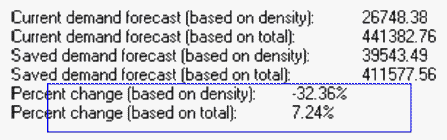
    Demographic Analysis results