
Auxiliary Equipment
Specific hardware equipment needed by your transit agency will be based on your requirements and the type of identification/card formats used.
Sign-In Terminal supports keyboard emulation. Input devices (for example, scanners or readers) must support keyboard emulation to work with Sign-In Terminal.
Types of equipment commonly used with Sign-In Terminal.
- swipe card readers
- bar code scanners (including PDF417 bar code scanners)
- HID proximity card readers
- POS thermal printers
For more information, contact your Trapeze representative.
Sign-In Terminal Hardware Recommendations
| OS | Peripherals | CPU | RAM | Disk |
|---|---|---|---|---|
| Windows 11 | 19" Display Keyboard Mouse |
4 | 8 GB | 500 GB |
| Peripheral type | Recommended products |
|---|---|
| HID proximity reader | HID OMNIKEY 5427 CK |
| POS thermal receipt printer |
EPSON TM-T20IV Citizen CT-S310II |
Configuring PDF417 Bar Code Readers
The PDF417 bar code reader is used to read PDF417 bar code symbols found on driver's licenses.
To configure the bar code reader, scan the bar codes in the order that they appear in the following table.
| Description | Bar Code |
|---|---|
| 1. Start Configuration | 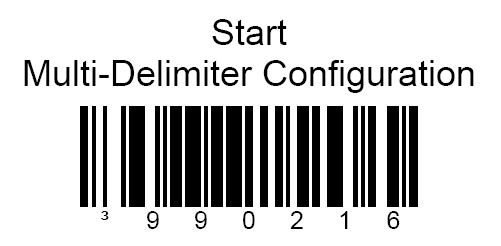 |
| 2. Caret ^ | 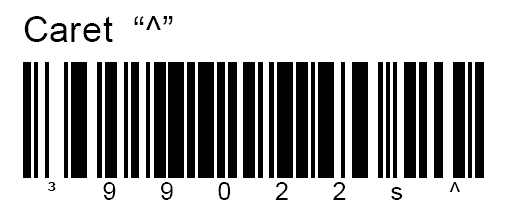 |
| 3. ID Number | 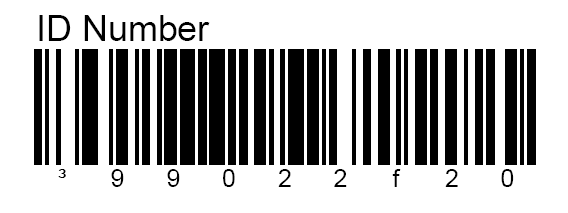 |
| 4. Caret ^ | |
| 5. Expiration Date | 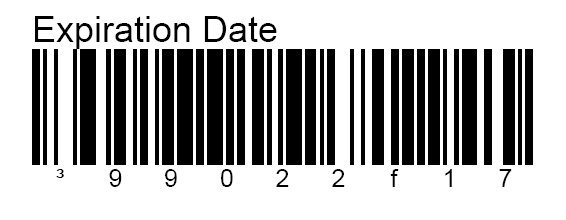 |
| 6. Date Format | 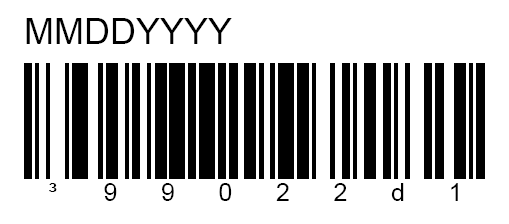 |
| 7. End Configuration | 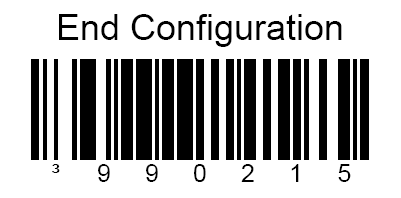 |