
Adding Departments
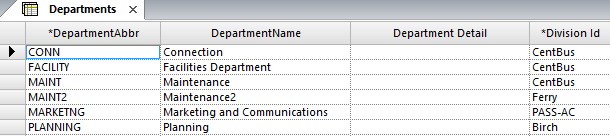
The Departments screen allows you to define all departments in each division at your transit site.
-
Click .
-
Click the Add New button:

- In the Department Abbr field of the new row, type an abbreviation for the new department.
- In the Department Name field, type the full name of the department.
- In the Department Detail field, type a brief description of the area of responsibility of the department.
- In the Division field, choose the division to which the department is associated.
-
Click the Save button:
 Once you have created all necessary departments and divisions, the user responsible for typing feedback in the COM Representative screen can assign the feedback directly to the department responsible for handling it.