Place text in quotation marks for exact match search results.
IVR Activity Breakdown Report
The IVR Activity Breakdown report allows users to select from their report groups and
then break the information down into Daily, Weekly or Monthly graphs. This report presents the
Activity Report data in a more granular form.
Parameters
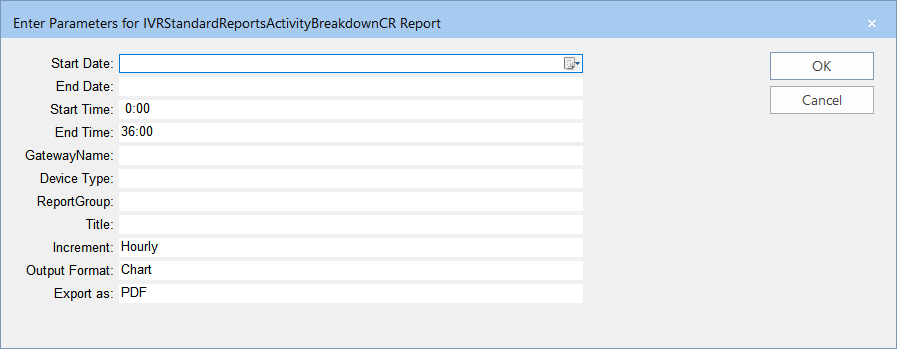
This report only requires the Device Statistics Summary to be available. The following
graphic shows the parameters that you can set to generate a report.
Parameters
Description
Start Date
Start date of the date range covered in the report.
End Date
End date of the date range covered in the report.
Start Time
Start time of the time period covered in the report.
End Time
End time of the time period covered in the report.
Gateway/Name
Name of the gateway device.
Device Type
Device through which communications are sent. The options shown in the list
box depend on the Device Types ancillary data created, for example: Email, SMS and
Voice.
Report Group
Report Group created for a specific purpose, for example, to track successful
and failed login attempts. The options shown in the list box depend on the Report
Groups created in the Report Groups Manager in the INFO web portal.
Title
Report Title or Custom title that you want to apply to the report.
Increment
Amount by which the data is added. The options are:
Hourly
Daily
Weekly
Output Format
Representation of the data. The options are:
Chart - Data is shown in graphical form such as in pie charts and bar
charts.
Grid - Data is shown in rows and columns.
Both
Export as
Format type of the report when exported – The options are:
csv - (comma or character-separated values) Comma delimited file
Excel - (Microsoft Excel) Spreadsheet
Excel Data Only
PDF - (Portable Document Format) Viewed using Adobe Reader - This is the
default.
RTF - (Rich Text Format) Formatted text
Word - (Microsoft Word) Formatted text
Sample Report
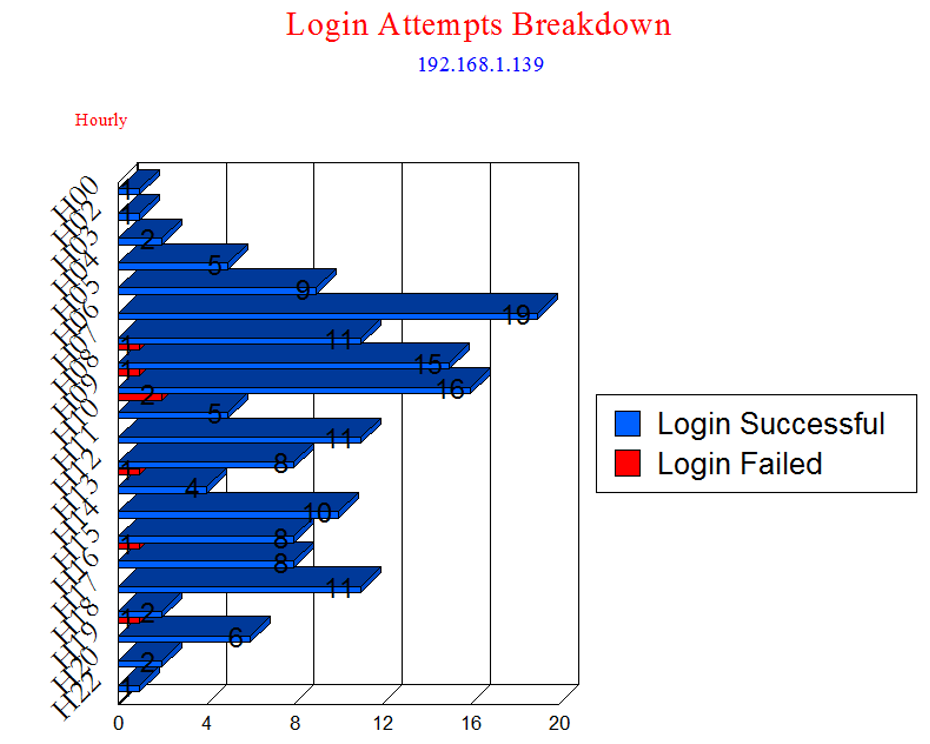
The following example shows the breakdown of the login data taken from the Activity
report: