Place text in quotation marks for exact match search results.
IVR Call Count Report
The IVR Call Count report displays the average number of calls per hour for all the
days within the report range selected. This report does not reference Report Groups and looks at
all calls in the system.
Parameters
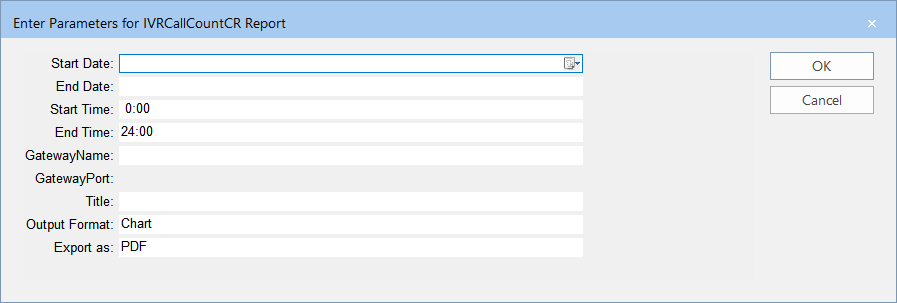
The following graphic shows the parameters that you can set to generate the report:
Parameters
Description
Start Date
Start date of the date range covered in the report.
End Date
End date of the date range covered in the report.
Start Time
Start time of the time period covered in the report.
End Time
End time of the time period covered in the report.
Gateway Name
Name of the gateway device.
Gateway Port
Port for the gateway device.
Title
Report Title or Custom title that you want to apply to the report.
Output Format
Representation of the data. The options are:
Chart - Data is shown in graphical form such as in pie charts and bar
charts.
Grid - Data is shown in rows and columns.
Both
Export as
Format type of the report when exported – The options are:
csv - (comma or character-separated values) Comma delimited file
Excel - (Microsoft Excel) Spreadsheet
Excel Data Only
PDF - (Portable Document Format) Viewed using Adobe Reader. This is the
default.
RTF - (Rich Text Format) Formatted text
Word - (Microsoft Word) Formatted text
Sample Report
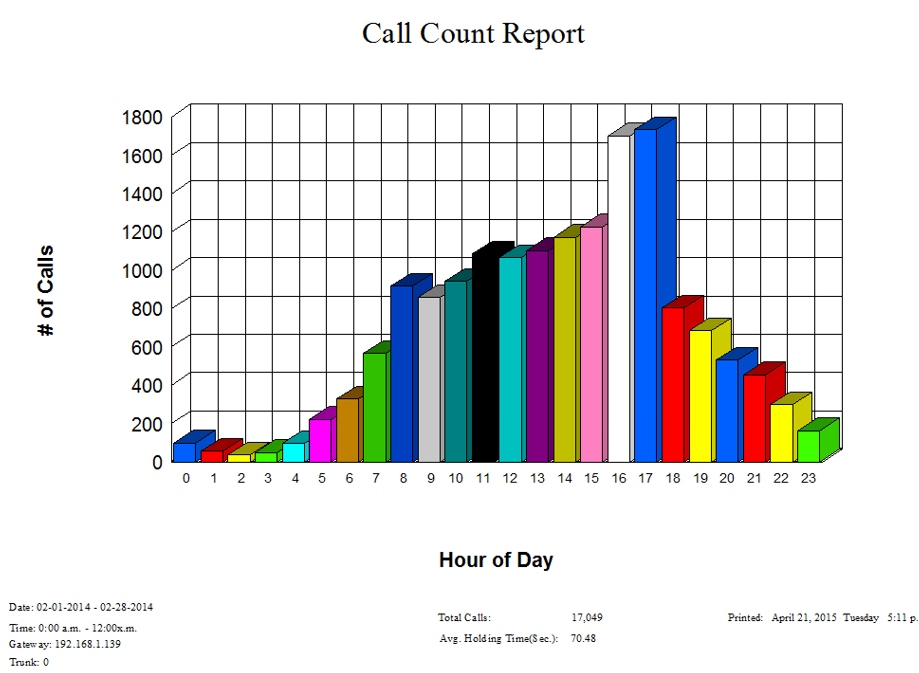
The following example shows the number of calls within each hour over a defined time period
and date range: