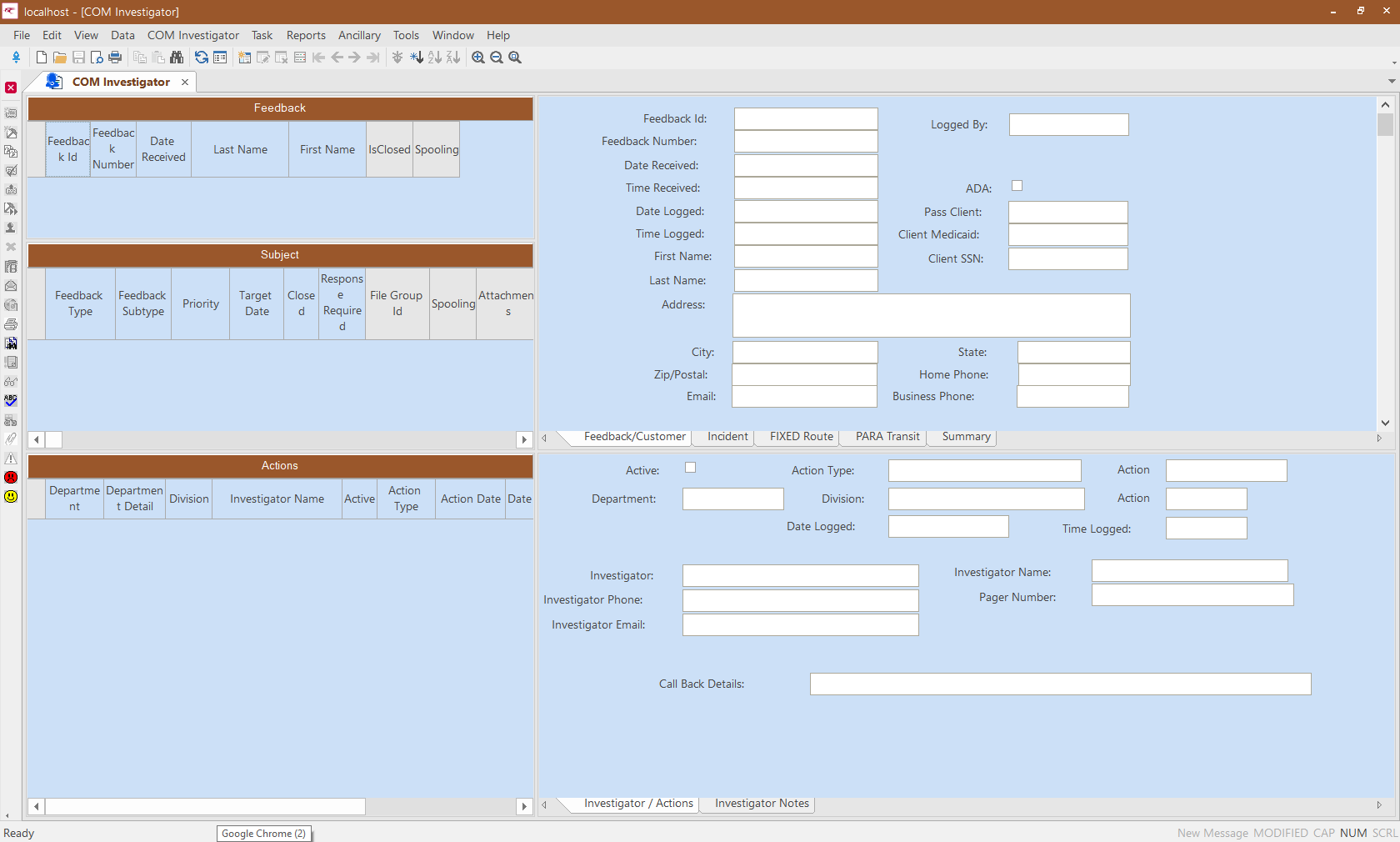
The COM Investigator screen appears in a format set as the
default.
The following graphic shows a sample COM Investigator screen. The fields
shown may be different from those in your workstation. Your transit site requirements will
determine the fields and tabs included in the screen.The information in the COM Investigator screen is grouped
together in grids similar to the COM Representative screen.
Left Section of the COM Investigator Screen
Table 1. Panes
Panes with Grids
Description
Feedback
Lists feedback entries that are sorted from the earliest to the most recent
date as defined in the Context dialog.
Subject
Displays all subject entries for the feedback selected in the Feedback
pane.
Actions
Shows all actions recorded on the selected subject.
Record Colors
In the Feedback and Subject panes, records are
highlighted in different colors to help you identify and prioritize tasks:
Table 2. Colors
Color
Description
Red
Highlights feedback whose target date has expired and the feedback has not
been closed.
Blue
Signifies that today is the target date and the feedback requires immediate
attention.
Black
Indicates feedback with a future target date or feedback that has been
closed.
Green
Indicates feedback was generated using the COM-Web module. Contact your
Trapeze representative for more information on this module.
If a feedback record has two subject entries with different priority levels, the
feedback is highlighted with the color of the feedback with the higher priority. For
example, one subject has a future target date (black) and the other has an expired target
date (red), the record is highlighted in red since the second subject has a higher
priority.
Right Section of the COM Investigator Screen
The right section of the screen contains two panes showing fields in various formats:
Table 3. Panes
Panes
Description
Feedback content
The top pane contains five workbook tabs by default (shown in Detail view):
Feedback/Customer, Incident,
FIXED Route, Para Transit, and
Summary. Original feedback information appears in these
sheets for the selected feedback.
Investigator/Action content
The bottom pane contains two workbook tabs by default:
Investigator/Actions and Investigator
Notes. The input fields on these tabs are used to record investigator
information and actions.