
Adding Report Groups
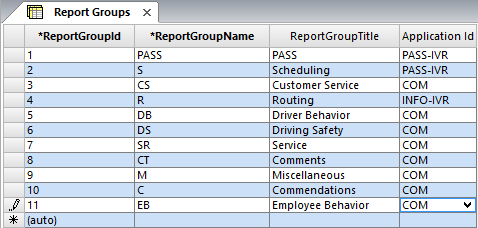
The Report Groups screen allows you to define groups for categorizing feedback subtypes.
Instead of having to go through similar feedback subtypes, for example, Driver was driving too fast, Driver was rude, Driver was driving erratically, and other feedback subtypes that describe incidents about the behavior of drivers, placing them under one general report group such as "Driver behavior" allows you to find the appropriate feedback subtype more efficiently.
Reports can be generated by report group, which means that information from all feedback subtypes in a selected report group may be included in a report.
-
Click .
-
Click the Add New button:

- In the Report Group Name field of the new row, type an abbreviation for the report group.
- In the Report Group Title field, type a description of the report group.
- In the Application Id field, select the appropriate Trapeze application from the drop-down list. The applications are listed in the Trapeze Applications ancillary data screen.
-
Click the Save button:

After all report groups are defined, you can assign feedback subtypes to them.