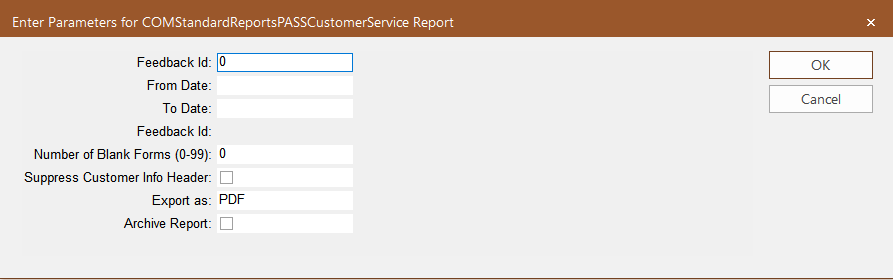
The PASS Customer Service report is similar to Customer Service report and is used for
paratransit customers, including paratransit information such as schedule times, early/late
times.
Parameters
Table 1. Pass Customer Service Parameters
Parameter
Description
Feedback Id
Specific feedback identified by the Feedback ID. (Choose this parameter or set
a date range using the From Date and To Date parameters to narrow the search for the
feedback report you want.)
From Date
Start date of the date range covered in the report.
To Date
End date of the date range covered in the report.
Feedback Id
This second Feedback Id field appears if you filter by date range. Select the
feedback report you want from the list created within the date range.
Number of Blank Forms (0-99)
Number of blank forms of the report that you want to print.
Suppress Customer Info Header
If selected, the customer information is not shown in the report.
Export As
Format type of the report when exported – The options are:
csv - (comma or character-separated values) Comma delimited file
Excel - (Microsoft® Excel) Spreadsheet
PDF - (Portable Document Format) Viewed using Adobe
Reader® - This is set as the default.
RTF - (Rich Text Format) Formatted text
Word - (Microsoft Word) Formatted text
Archive Report
If selected, a copy of the report is saved so it can be later viewed in the
Report Archive module.
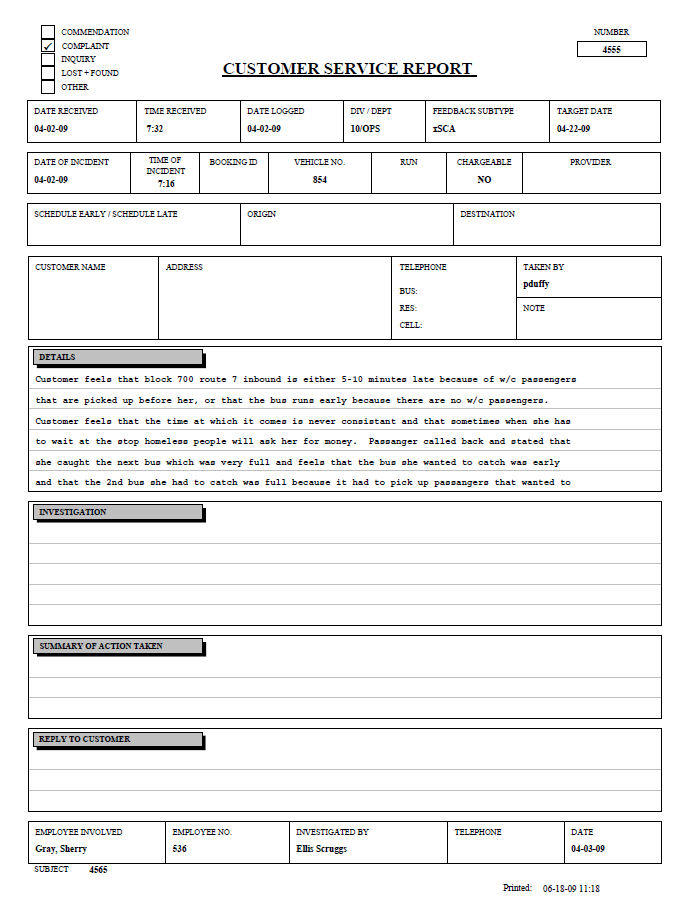
Sample Report
The following example shows a form that is similar to the Customer Service Report.