
Viewing Messages
You can view messages sent to you from Dispatch. If you have a new message, the Messages button on the bottom navigation bar shows a plus sign .
About this task
Messages are displayed in the order they were created. If there are multiple messages, when you clear the first notification, the next message in the queue is shown.
Procedure
-
Tap Messages at the bottom navigation bar.
 The list of messages is displayed.
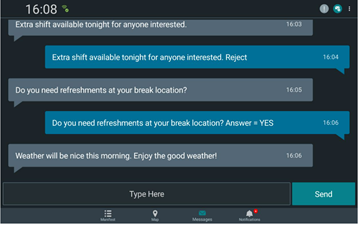 Note: If a message requires a response from Dispatch, a notification appears indicating the type of response and action required such as acknowledging the message.
 - Tap the message you want to view.