The Smart Safety Reminders provide a way of displaying warnings and reminders to the driver when arriving and performing events based on specific space or mobility types.
These reminders are customizable and require the driver to acknowledge them prior to
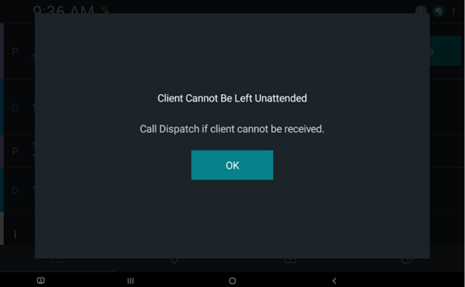
continuing with their manifest. For example, a warning could show that the clients are not
to be left unattended. In this case, a Do Not Leave (DNL) mobility aid would be created and
assigned to the client. When the driver arrives and performs the event, they would see a
reminder as shown in the following image:
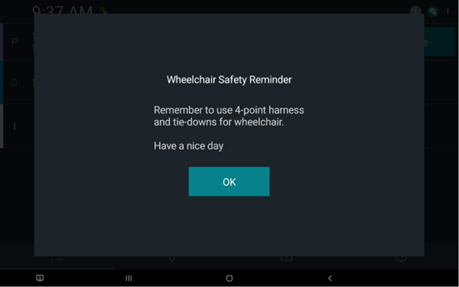
The following image also displays another example of a reminder to drivers about properly
securing clients on wheelchairs:
Configuration
Safety Reminders are added to DriverMate via the JSON Settings file. They exist as a separate array labelled as "smartSafetyReminders".
Table 1. Smart Safety Reminders Settings
Field
Description
Title
Name of the safety reminder
Trigger Actions
An array of actions that prompt a Safety Reminder to appear.
Valid values for
trigger actions are:
pickup arrive - The Safety Reminder is displayed when Arriving Pickup
Events.
dropoff arrive - The Safety Reminder is displayed when Arriving Dropoff
Events.
pickup perform - The Safety Reminder is displayed when Performing Pickup
Events.
dropoff perform - The Safety Reminder is displayed when Performing Dropoff
Events.
More than one value can be included in the array to make the Safety
Reminder appear in multiple situations.
Trigger Types
The lists that have different attributes of events that determine if Safety
Reminders are applicable to those events:
Space Types
Mobility Aids
Client Types
The items in these lists are compared to the details of the Event to
determine if the Safety Reminder should be displayed when the Event is performed
or arrived.
Display Text
An array of strings displayed in the Safety Reminder. Each string in the array
is displayed on separate lines.
Response Type
The type of response accepted by the Safety Reminder. The options are:
ok - Does not allow a negative response to the reminder.
yes/no - Allows user to respond positively or negatively to the reminder.