
Configuring CTM Server
CTM Server must be configured to work with your system.
About this task
Procedure
-
Navigate to and double-click CtmSrv41.exe.
Typically, the CTM Server file is found with your other Trapeze4 installation files.Depending on your system setup, you may need to run the .exe file as Administrator.
-
Click .
Refer to the INFO-Agent System Administrator Guide for additional information on CTM Server configuration.The CtmSrv Configuration dialog box appears.
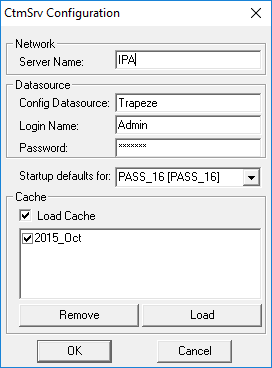
- Verify that all of the settings are correct.
- Select Load Cache.
- Note the Server Name.
- Click OK.
- Close the CTM Server application.
- Open the Trapeze4 Workstation.
- Click .
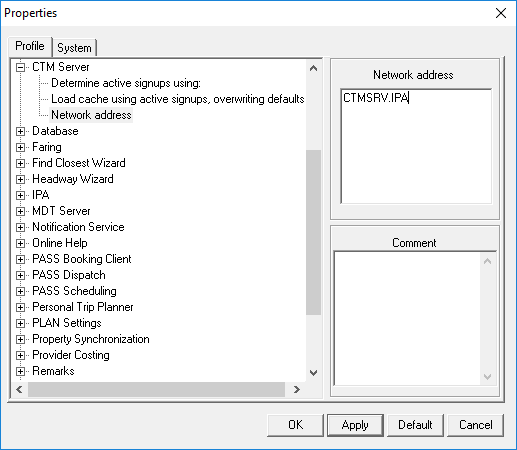
- On the Profile tab, expand CTM Server.
- Click Network address.
-
Confirm that the text following CTMSRV. matches the previously
noted server name. For example IPA.
If the names do not match, obtain the correct server name and specify it in the TPnet.ini file (found with your Trapeze4 installation files); in the CtmSrv Configuration dialog box; and in the system property (found in the Trapeze4 Workstation, under , on the Profile tab, under ).
- Click OK.