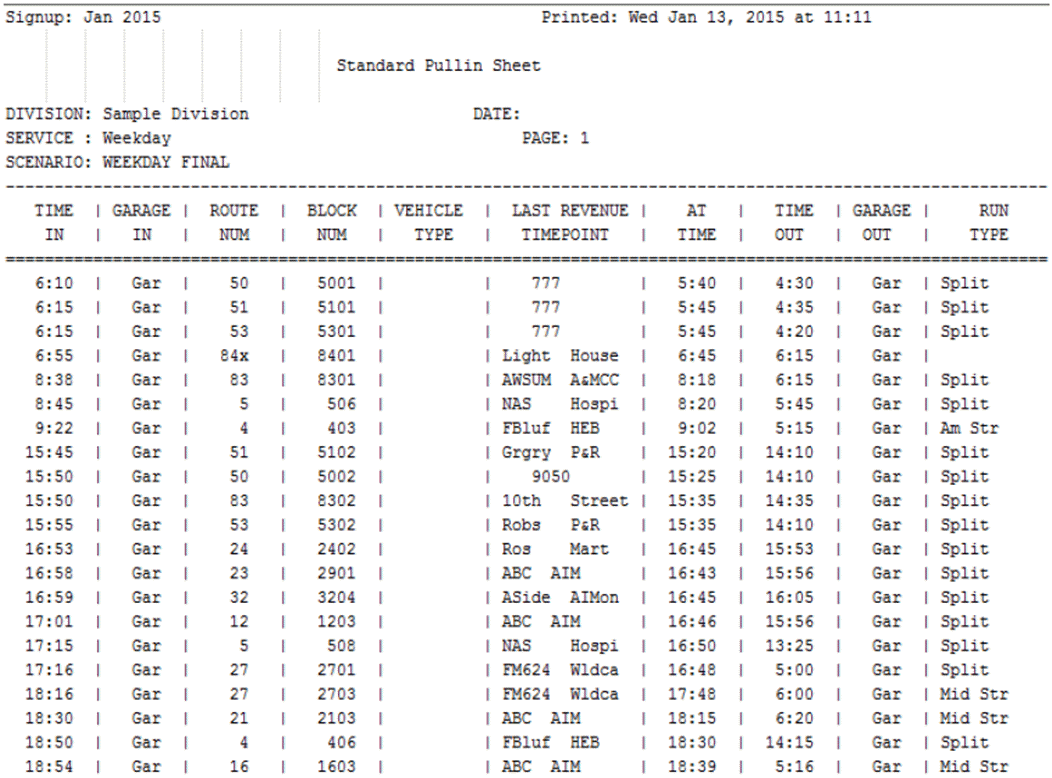
The Pull-in Sheet provides a list of the pull-in (PI) times by division and service. It
provides the block number, last revenue timepoint, and run type.
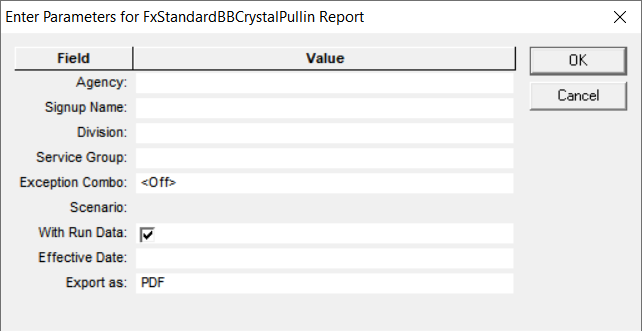
The following graphic shows the Pull-in Sheet parameters:
Parameters
Description
Agency
Agency code
Signup Name
Name of sign-up period
Division
Division code
Service Group
Service Group abbreviation
Exception Combo
Selected exception combination. This is set to <Off> by default.
Scenario
Runcut solution comprised of the selected parameter settings and the
resulting runcut. This field is enabled after you select the Service
Group.
With Run Data
If selected, the run type is shown.
Effective Date
Information related to the period when the report is in effect.
Note: This is
a text field. You can enter any piece of data you want to include in the report,
for example, date or name of user.
Export as
Allows you to select the format type of the report:
CSV (Comma-separated values file that is read with spreadsheet program)
Excel (Microsoft spreadsheet)
PDF (Read with Adobe Reader)
RTF (Rich Text Format)
WORD (Microsoft Word)
The following graphic shows an example of a Pull-in sheet: The At Time refers to the time that the vehicle is at the
first revenue node during the trip.