
Importing Runs from Another Scenario
If you used the FX Runcutter feature, you may want to import the runs generated into BlockBuster Web for further processing.
- After changing a block and you load a scenario, the run data does not match the block data in the scenario.
-
After you have copied scenarios using FX Copy. (You must have the necessary security permission to run FX Copy.)
-
On the Runs screen toolbar, click the
Import/Export Runs button:
 The Import/Export Runs dialog appears.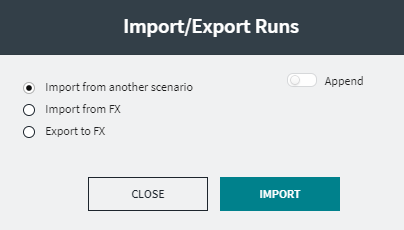
-
Click Import from another scenario.
The Select Scenario dialog appears.
-
Select the scenario from which you want to import runs and click
OK.
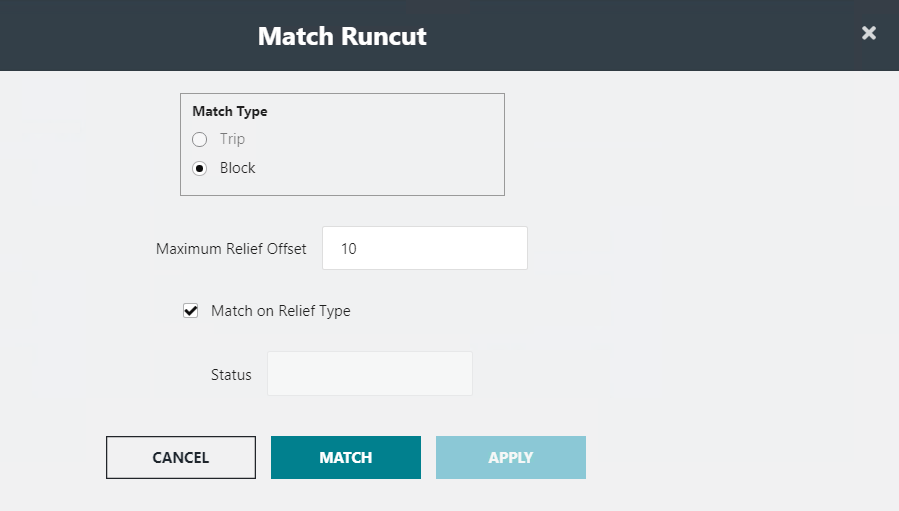
The Match Runcut dialog appears.
-
Perform one of the following steps:
- To match the trips, select the Trip option.
-
To match the blocks, select the Block option. Change the value in the Maximum Relief Offset field, if necessary. The value is set to 10 minutes by default.
- Optional: To import runs that match the run types in the selected scenario, select the Match on Relief Type check box.
-
Click Match.
The Status field shows the number of runs that match or do not match.
- Click Apply.