
Viewing Reliefs
View the relief points assigned to a block at any time either on the Runs or Block panes in the Runs screen during the runcutting process.
If the runs are not sorted by blocks, click the Block Number column header until they are sorted accordingly.
- Select a run of the block whose reliefs you want to view.
-
On the footer, click View Reliefs:
 The View Reliefs pane appears on the left pane of the screen.
It displays the node, time, line, exceptions and all reliefs including deadheads for the selected piece of work in time order. It helps you understand the frequency of reliefs on runs. It shows you the relief points associated with a particular block.
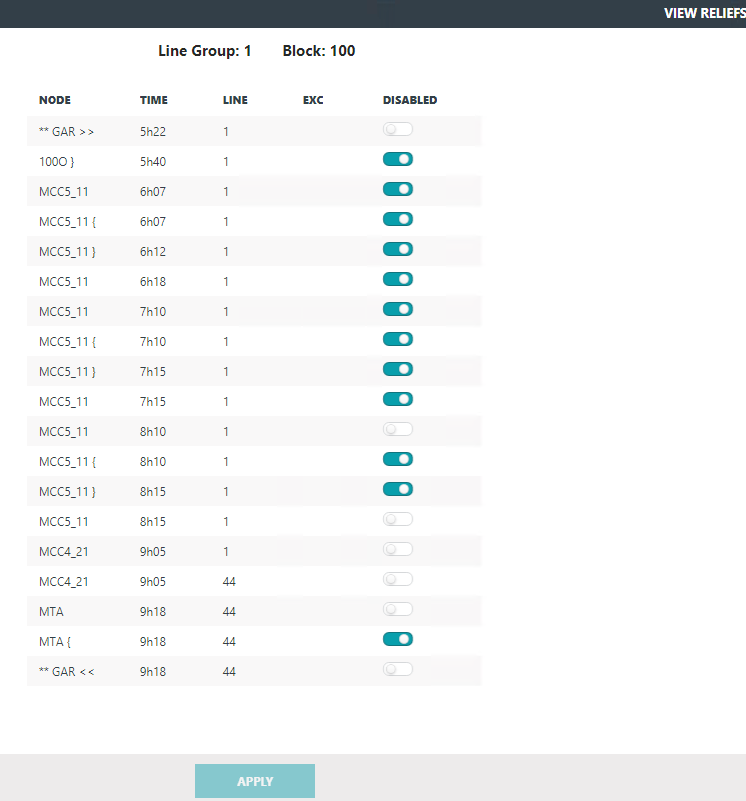
In the sample graphic, the type of reliefs in the identified relief points are represented by operational signs. For example, the first point, GAR in the Node column is shown with two operational signs: ** which means the relief at the start of the run and >> which means that it is a pull-out garage.
The nodes that have the Disabled toggle set to On are restricted from being a relief point at particular times within the specified time period.