
Using the Blocking Tool
The Blocking tool enables to check and assign or reassign garage pull-out or pull-ins to your Blocked data. This is useful with exception data.
- Display: Enables you to select the blocked or unblocked trips to be displayed in the grids by Service Group, Line Group and if applicable, by Exception.
- Select: Enables you to select the blocked or unblocked trips to be displayed in the grids by a specific line, block, or time range after selecting the trips you want in the Display frame. You can use these fields in combination to select the trips to be displayed.
- Update: Enables you to change the trip data displayed in the grids.
For example, change the time of a garage deadhead (pull-out).Note: Ensure that the appropriate context you want has been applied in the Display and Select frames before updating any blocking data.
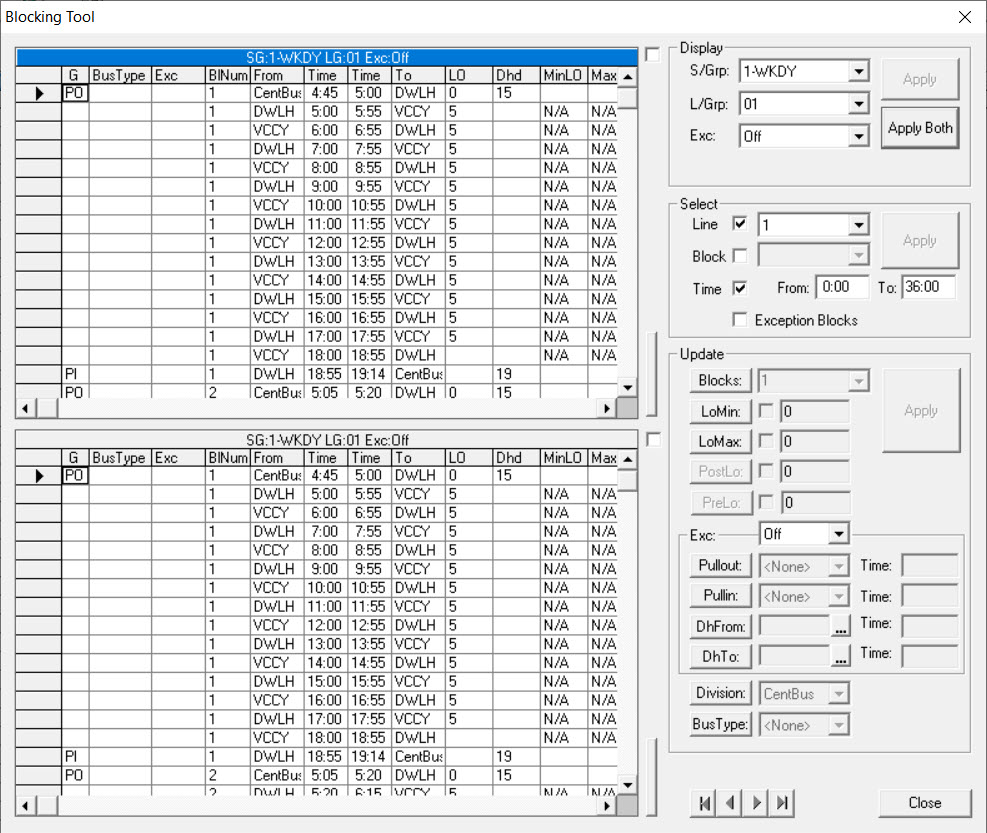
- To toggle between viewing one grid at a time or both grids at the same time, click the vertical buttons on the side of either grid.
-
To help you move through the grids depending on where your row marker is located, click
any of the four buttons at the bottom of the dialog box:
- |<<: Moves the row marker to the first record.
- <: Moves the row marker to the previous record.
- > : Moves the row marker to the next record.
- >>|: Moves the row marker to the last record in the grid.