
About the Spatial Data Export Tool
The Spatial Data Export tool is used to export spatial (map-related) fixed route data to a specified format.
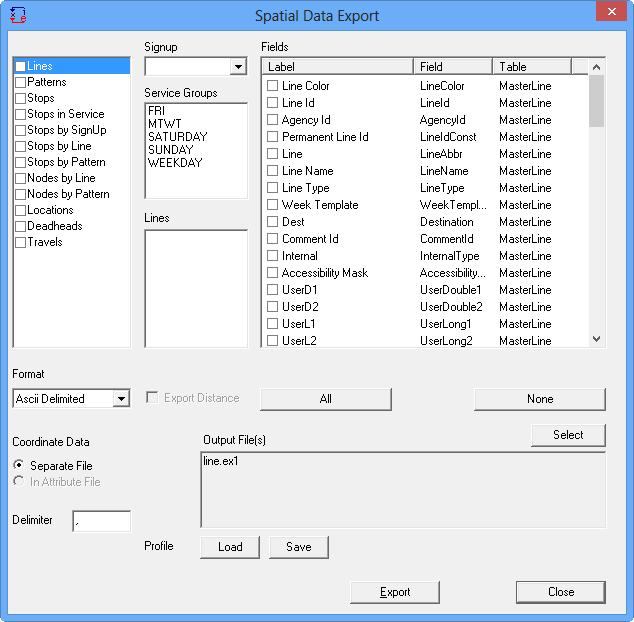
The built-in formats supported are: (The following options are in the
Format drop-down list.)
- Ascii Delimited
- MapInfo (mid and mif files)
- KML (Keyhole Markup Language) (kmz files)
- ArcInfo (ESRI Shapefiles shp, shx and dbf, which are used with MapObjects). If MapObjects is not available in your system, the ArcInfo format does not appear in the list. (You must have ArcView installed on your system.)
The export types available allow you to export spatial as well as associated attribute
data. The items in the Export frame are:
- Lines: Exports the line map trace data for each of the selected lines and allows you to choose attribute data such as the Line Id, Name, Abbreviation, Direction names and any supplementary data from the Line and MasterLine tables that are available for your transit site.
- Patterns: Exports the pattern map trace data along with attribute data from the MasterPatterns table.
- Stops: Exports all stops in the database regardless of line or sign-up period. Selecting lines when you choose this option has no bearing on the export.
- Stops by Line: Exports the stops in sequence for each line direction. Attribute data from the LineStops, Stops, Nodes, Line and MasterLine table may also be exported.
- Stops by Pattern: The stops in sequence for each pattern on the selected lines. Attribute data is available from LineStops, Stops, Nodes, Line, MasterLine and the MasterPattern tables.
- Nodes by Line and Nodes by Pattern: Similar to the Stops export but only the nodes are exported.
- Locations: Exports all locations in the database to ESRI or MapInfo GIS file.
- Deadheads: Exports deadhead traces of both service group and line dependent deadheads.
- Travels: Exports travels.