
Copying Reliefs from One Service to Another

You can copy reliefs from one service group to another service group.

  1. On the Unattended Reliefs tab, click Copy.
    The Copy dialog box appears.
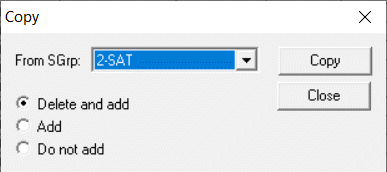
    Copy Relief dialog box
  2. In the From SGrp drop-down list, choose a service group.
  3. Do one of the following steps:
    • To overwrite the new reliefs over the old, select the Delete and add.
    • To add the new list to the old, select Add.
    • To prevent new records from being added if an old version already exists, select Do not add.

  4. Click Copy.