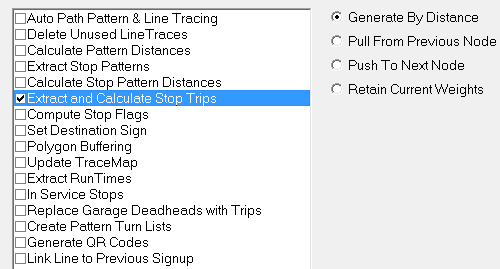
The Extract and Calculate Stop Trips tool is used to create stop trips and calculate
their time for the lines and services you want.
Stop Trips can only be generated when the stop patterns have
been made and stop to stop distances have been calculated. This feature requires that patterns
be geocoded.
-
Click . The Extended FX Data Tool appears.
-
In the Service list, choose the service you
want. The default is set at <All> for all lines.
-
To select more than one Service, choose
<Custom>.
The Select Service dialog box appears.
-
Select Extract and Calculate Stop Trips.
-
In the right frame, select one of the following options:
- Generate by Distance: The system interpolates times based
on the node times and stop to stop distances. This is set as the default.
- Pull from previous Node: For trip planning purposes, this
option is not recommended because it may result in invalid information especially for
line transfers.
- Push to Next Node: Not also recommended for trip planning
purposes.
- Retain Current Weights: The stops in the patterns are given
the weight of 1 by default. If you used the Linked Weights feature and want to use the
weights that you have set, leave this option selected.
-
Click Execute.
-
Click Close.