Place text in quotation marks for exact match search results.
Replacing Garage Deadheads with Trips
The Replace Garage Deadheads with Trips tool is used to change garage
(pull-out/pull-in) deadheads into trips before runcutting.
Click Tools > Extended FX Data Tool. The Extended FX Data Tool appears.
In the Service list, choose the service you
want. The default is set at <All> for all lines.
To select more than one Service, choose
<Custom>.
The Select Service dialog box appears.
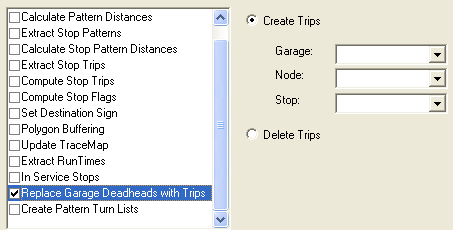
Select Replace Garage Deadheads with
Trips.
The Create Trips option is selected by default.
In the Garage list, select the appropriate garage.
In the Node list, select the appropriate node that will replace
the garage.
In the Stop list, select the appropriate stop that is associated
with the node.
Click Execute.
Click Close.
In a multi-agency environment, garages are grouped by agency. The garages associated
with a specific agency are shown in the Garage list. If you are
changing to a different agency to reassign other garages, you must exit the workstation
and log on again.