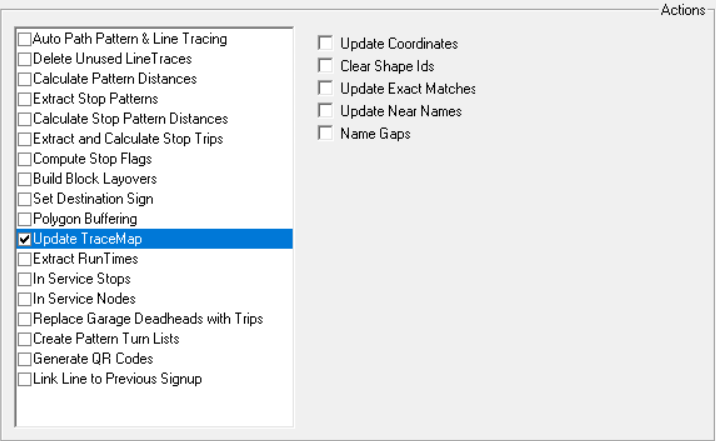
The Updated Trace map tool converts XY coordinates to match longitudes and latitudes.
If there are invalid latitudes and longitudes but valid xy data, the system produces an
error message and you are asked to correct the data. This option is typically applied after a new base map has been installed or after using the TSDE Import
feature. (Contact your Trapeze representative for more information regarding TSDE.) It also enables you to copy the log
into temporary memory.
-
Click . The Extended FX Data Tool appears.
-
In the Service list, choose the service you
want. The default is set at <All> for all lines.
-
To select more than one Service, choose
<Custom>.
The Select Service dialog box appears.
-
select Update Trace Map.
-
Select one or more of the following options:
- Clear Shape Id's: If selected will set the NameId and
ShapeId to zero for all records.
- Update coordinates: If selected converts XY coordinates to
match longitudes and latitudes.(This is the only function that this tool previously
performed.)
- Update Exact Matches: If selected, the NameId and ShapeId
are updated when the tracemap record exactly matches a MapShp record.
- Update Near Names: If selected, the NameIds are updated
based on a nearby mapshp record that is at a similar angle.
- Name Gaps: If selected, when a shp record on a deadhead or
pattern trace has no name and is located between segments that have the same name, it is
also assigned that name.
-
Click Execute.
-
Click Close.