Place text in quotation marks for exact match search results.
Adding Relief Restrictions
To apply some limitations on reliefs when updating relief events, use the
Relief Restrictions feature. For example, you do not want to have any
reliefs on a line specifically from 6:00 to 9:00 a.m. in certain areas for safety reasons.
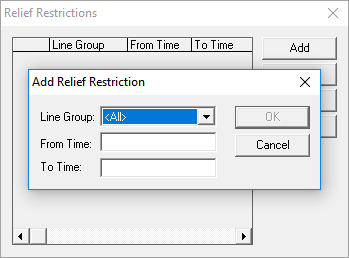
Select the appropriate line group from the Line Group drop-down
list.
Click Add.
The Add Relief Restrictions dialog box
appears.
In the From Time and To Time fields, type
the time interval to which you want to apply restrictions. For example, in the
From time field, type 6:00 and in the To
time field, type 9:00. These fields are set at 0:00 and 36:00, respectively,
by default.
Click OK.
The data is added to the Relief Restrictions dialog box and
the Add Relief Restrictions dialog box closes.
Note: To edit or delete a relief restriction in the Relief
Restrictions dialog box, select the relief restriction you want and click
Add or Delete accordingly.