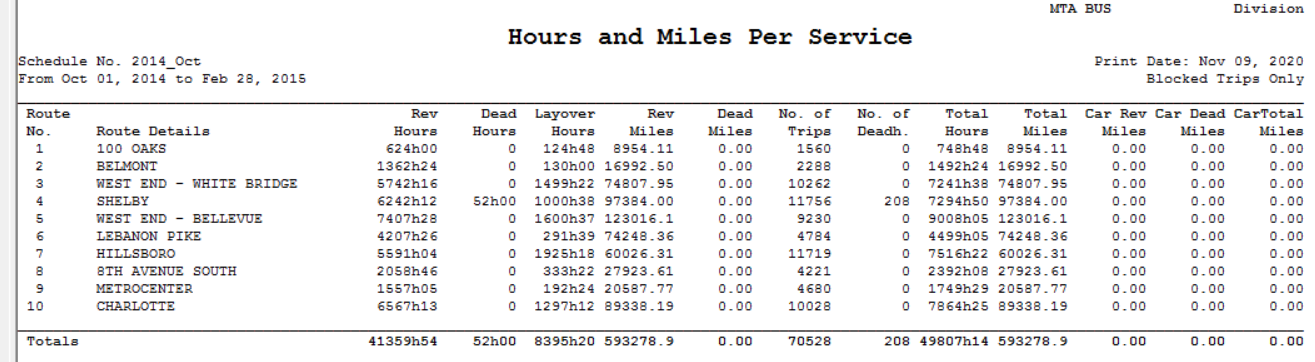
The Hours and Miles report provides summary revenue and non-revenue time and distance statistics of selected lines within a specified time period, for example, from MM-DD-YY date to MM-DD-YY date of a sign-up period.
Support for UK style deadheads has been added to the report.
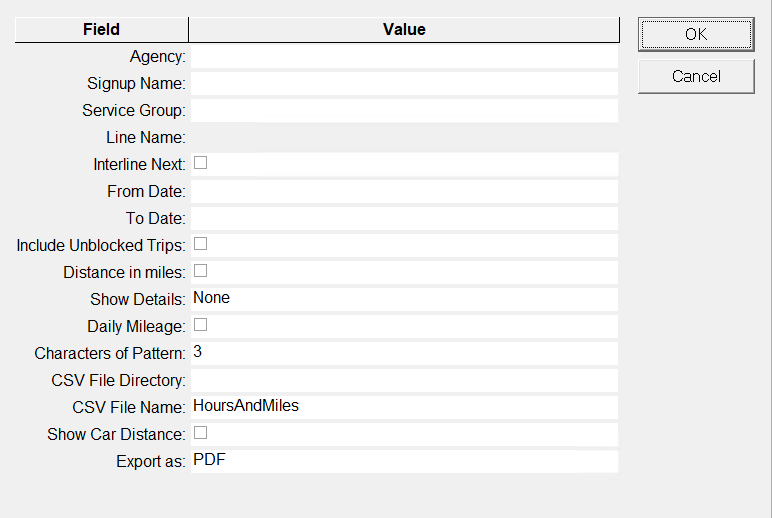
The following graphic
shows the Hours and Miles report parameters ( for Crystal reports):
Parameter
Description
Agency
Agency code
Signup Name
Sign-up period
Service Group
Service Group Abbreviation
Line Name
Line Number - This is enabled after you select the Signup Name.
InterLine
Next
If selected, an Interline deadhead is added after the pull-out/before the
pull-in. It occurs between different nodes.
From Date
Start date of the time range covered by the report.
To Date
End date of the time covered by the report.
Include Unblocked Trips
If selected, the trips that have not been blocked are included in the
report.
Distance in miles
If selected, the distance is shown in miles.
Show Details
Options are:
None
Pattern Details
RevenueNo Details (revenue number details)
Daily Mileage
If selected, the daily mileage is included in the report.
Characters of Pattern
Number of characters of the pattern name to be displayed in the report.
CSV File Directory
File directory where the csv file is stored.
CSV File Name
HoursAndMiles - This is the file name by default, which you can
overwrite.
Show Car Distance
If selected, trip distance is multiplied by the number of cars on the
rail.