
Creating Special Point Types
To place special points at a consistent distance before every stop in a pattern, use the Create Special Points feature, for example, you want special points of a specific type to be 100 meters before each stop.
-
Click .
The Create Points dialog box appears.
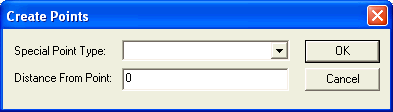
- In the Special Point Type drop-down list, select a special point type.
- In the Distance from Point field, type the distance where you want the special points to be located before the stops.
- Click OK.