
Modifying the Stop Trips Displayed
The Show tab in the Stop Trips Edit dialog box serves the same purpose as the Show tab in the Trips Edit dialog box, allowing you to modify how the screen appears.
-
On the Stop Trips tab, click Edit:
 The Stop Trips Edit dialog box appears.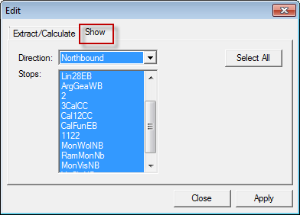
- Select the Show tab.
- In the Direction drop-down list, select the appropriate direction.
- In the Stops frame, select the stops that you would like to view on your screen.
- Optional: To display all the stops on the screen, click Select All.
- Click Apply.
- Click Close.