Place text in quotation marks for exact match search results.
Generating Random Sample Trips
You can generate a list of randomly selected trips from all services within a defined time period.
Do one of the following:
Click Ridership > Random Sample Extract.
Click the Random Sample Extract button: .
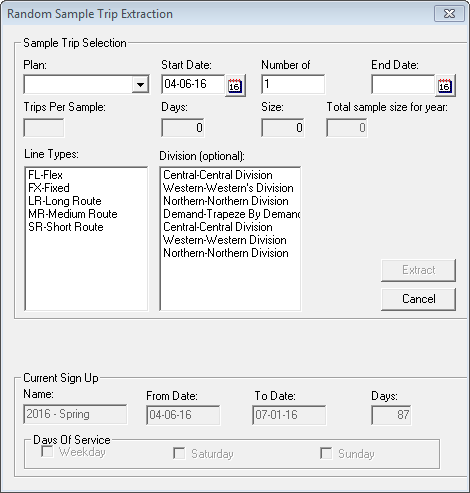
The Random Sample Trip Extraction dialog box appears.
Do one of the following steps as applicable:
For FTA sites: In the Plan drop-down list, select an FTA
plan.
For non-FTA sites: In the Trips Per Sample field, type the
number of trips that you want to extract.
Do one of the following steps:
In the Start Date and End Date
fields, type the start and end dates of the date range you want.
Click the calendar icon beside each field and click the dates on the
calendar.
If you selected one of the options: Quarterly,
Monthly, and Weekly that align with the
requirements of the National Transit Database (NTD) sampling manual, and then set the
start date of the sample period, the end date that is automatically generated is based on
the selected option. For example, if you selected Weekly in the
Plan field, and then set the Start Date on
04-06-18, the End Date automatically generated is 04-12-18.
The Days, Size, and Total
sample size for year fields are also automatically filled in based on your
Plan and date values. The Days field is not shown if you selected
a non-NTD Plan option.
Optional: In the Line Types list, select the appropriate type of
line.
Optional: In the Division field, click the division to which the selected
line type belongs.
Click Extract to create a list of randomly selected trips from
all services.
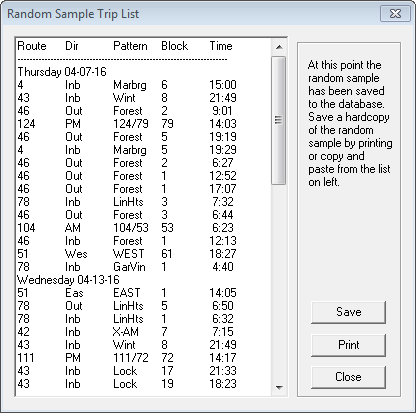
The Random Sample Trip List dialog box displays the
generated list of trips.

 .
.