
Closing Subjects
If no additional information is required or is to be added, you can close subjects of a record in the COM Investigator screen.
-
Click the Close Subject button:
 .
If actions associated with the subject are still active, a message appears asking if you want to mark them as inactive and close the subject.
.
If actions associated with the subject are still active, a message appears asking if you want to mark them as inactive and close the subject.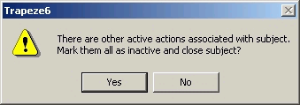
-
Click Yes.
The Closed check box in the Subject pane is automatically selected. The Date Closed and Time Closed fields are stamped with the date and time on your workstation and the Closed By field is stamped with your user name.

-
Do one of the following steps:
- Press F5.
- Click the Refresh button:
 .
.
The subject entry is highlighted in black.If the Feedback contains, for instance, two subjects—one that is closed and another that is not closed—the Closed column in the Feedback pane displays a gray check mark in a grayed out check box. If all subjects are closed, the Closed column in the Feedback pane shows a black check mark in a check box with a white background.