
Setting the Context for the Registered Users Screen
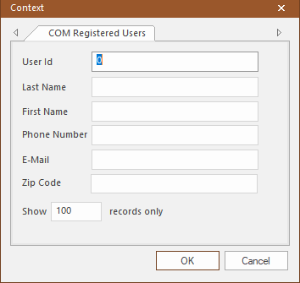
The Context dialog allows you to set the data that is displayed in the Registered Users screen.
- Click .
-
Click or press F3.
The Context dialog appears.
-
Fill in the fields by which you want to search:
-
User Id - This is set to 0 by default. Unless you know the User Id of the record you want, do not change or delete the default. If left blank, a message appears asking you to type an integer.
- Last Name
- First Name
- Phone Number - The phone number may appear masked as defined in the Screen Information screen.
-
E-Mail
-
Zip Code
-
- In the Show XXX records only field, type the number of records you want displayed.
- Click OK.