Place text in quotation marks for exact match search results.
Sample Call Process Flow
The process flow for inbound and outbound calls is similar except that for the outbound
call, the Trapeze application service initiates it by requesting Voice Gateway to open a channel
with the phone system.
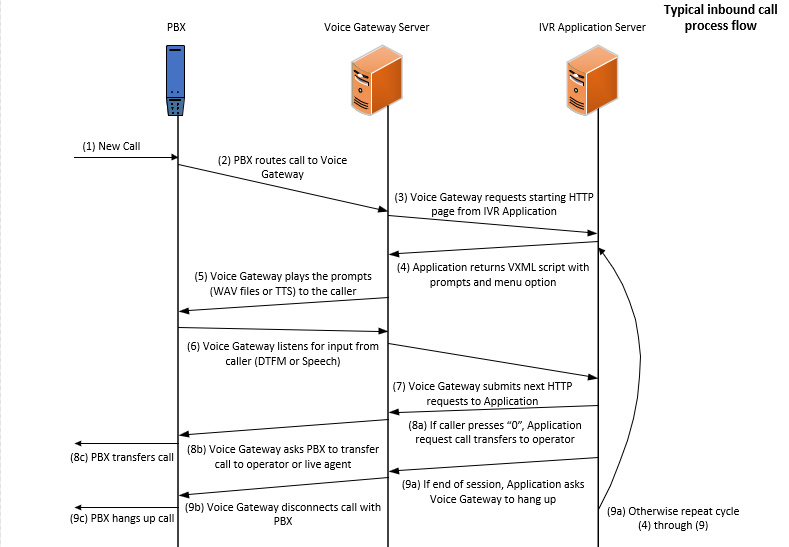
The following summary describes a typical inbound call process flow:
A call is initiated from the PSTN to your phone system (for example, a caller dials the
external number associated with your PBX or IVR system).
The PBX routes the call to the Voice Gateway using the appropriate connection type for
your site (T1/E1, Analog or SIP).
The Voice Gateway detects the inbound call from the PBX and requests the starting page
from the Trapeze application.
The Trapeze application service returns a VXML document describing the prompts and menu
options that the caller can choose.
The Voice Gateway plays the prompts using prerecorded wav files, TTS synthesis or a
combination of the two.
The Voice Gateway listens for input from the caller (DTMF or Speech).
The caller makes a menu selection using DTMF or Speech.
The Voice Gateway detects the input and submits the next HTTP request associated with
that selection to the Trapeze application server.
The Trapeze application responds with the next VXML document and the process is
repeated until the call is ended.
The Voice Gateway disconnects the call with the PBX, which, in turn, disconnects from
the PSTN.
The following graphic illustrates a typical inbound call process flow: