
Assigning Audiences to Locations
Each Common Location must be manually configured for the various audiences that you have created. The following procedure describes assigning audiences to locations but not to location types.
-
Launch the Trapeze6 Service Shell and the Trapeze4 workstation.
Log in with the ID that has permission to view the Audiences configured in the Trapeze6 Service Shell.
-
In the Trapeze4 workstation, click .
The Common Locations screen appears.
-
On the Select tab, select the Common Location
that you want to configure.
On the Detail tab, the Audiences frame is shown below the Supplementary Data grid.
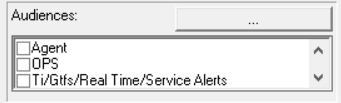
- In the Audiences field, select the check box beside the audience you want to be able to view the selected Common Location. This means that users or user groups who are part of the selected audience are able to view or access the Common Location.
Locations, which are not assigned to a specific audience, are displayed for all audiences. If you do not want a location displayed for all audiences, make sure to assign it to the audience for which you want it displayed only.