Using the Parameter Set Defined as the Default
The system automatically uses the setting defined as the default unless you specify otherwise.
Depending on what you are currently working on, perform the appropriate step:
- If you are working on a custom set that is not the default, click Use Default.
- To create a new set as the default, choose a set from the list and click Set As Default.
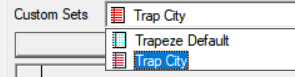
If you selected a new set, it is marked by a red page icon while the other sets
are marked by a blue page icon.