
Viewing Animated Itinerary/AVL Data on the Map
Animation settings control the playback of Itinerary/AVL data on the map.
Before you begin
Procedure
- Search for and show a run or vehicle itinerary or AVL information in the grid.
-
Click .
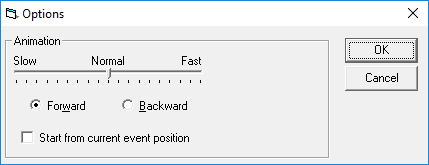
The Options dialog box appears.
-
Do one or more of the following:
To... Do this... Change the animation playback speed Move the slider to the left (slower) or right (faster). Play the animation forward Select Forward. Play the animation backward Select Backward. Start playback with the event currently highlighted in the grid Select Start from current event position. - Click OK.
-
Click Play:
