
Viewing Turn Lists
To view a vehicle’s turn list, you must have a trace displayed on the map.
Before you begin
Procedure
- Search for and show a run or vehicle itinerary or AVL information in the grid.
- Select Trace.
-
Click Display.
The itinerary appears in the grid and the route is traced on the system map.
-
Click Turn List:

-
Click the trace line on the map.
The Turn List appears.
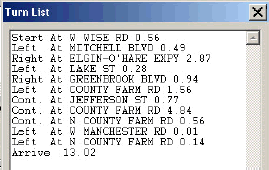
- Optional: To send the turn list to the mobile computer, click MDT Send.
- Optional: To print the turn list, click Print.