
Defining Booking Costs
Booking costs are paid to providers based on trips between polygons, passenger types, and space types.
Before you begin
About this task
Procedure
- In the Contract frame, click the contract for which to define booking costs.
- In the Validity frame, select a validity in the grid.
-
Click Edit.
The buttons in the Validity frame become available.
-
Click Booking Costs.
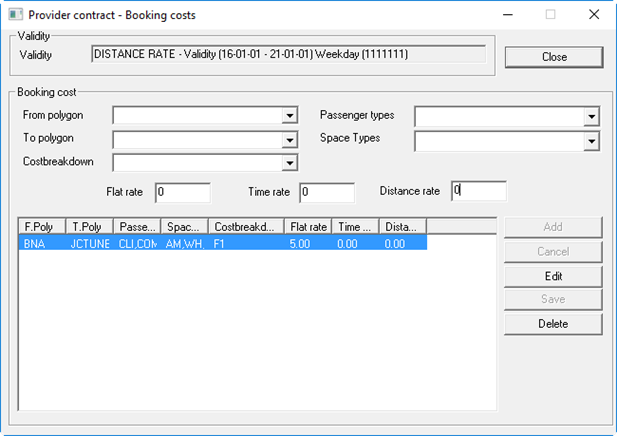
The Provider contract - Booking costs dialog box appears.
-
Provide the following information:
- From polygon
- Click the origin polygon in the list.
Polygons listed here are defined for the Para Service Area selected in , on the Profile tab, in .
- To polygon
- Click the destination polygon in the list.
Polygons listed here are defined for the Para Service Area selected in , on the Profile tab, in .
- Costbreakdown
- Click the cost breakdown label to apply.
- Passenger types
- Click the passenger type(s) in the list.
- Space Types
- Select the space types in the list.
- Flat rate
- Type the flat rate.
- Time rate
- Type the rate to charge per hour.
- Distance rate
- Type the distance rate.
- Click Add.