
Defining Tour Costs
Tour costs define how much a provider will be paid for a passenger, their companion or attendant, or for a dedicated or general escort provided by the transport authority.
Before you begin
About this task
Tour costs are calculated irrespective of the type or number of passengers being transported and are not dependent on the provider type. The total time spent by an escort to be used for payment purposes is calculated by the time that the escort will spend on board, and is not dependent on the time the client is on board.
To enable this method of costing escort trips, the Schedule Server Switch should be set to Yes. Otherwise, an escort tour is defined as a continuous range of pick-up and drop-off events on a run when a co-driver is present (that is, the co-driver flag is set, indicating that the run is not empty).
Procedure
- In the Contract frame, click the contract for which to define tour costs.
- In the Validity frame, select a validity in the grid.
-
Click Edit.
The buttons in the Validity frame become available.
-
Click Tour Costs.
The Provider contract - Tour Costs dialog box appears.
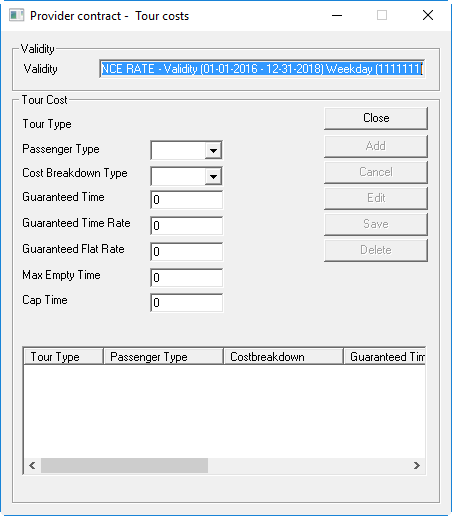
-
Provide the following information:
- Passenger Type
- Click the passenger type defined as the escort passenger type for the rate.
- Cost Breakdown Type
- Click a cost breakdown type.
- Guaranteed Time
- Type the rate at which the provider is guaranteed to be paid, taking into consideration the Time pay unit, Time pay interval, and the Time rounding method defined in the Provider Contract dialog box.
- Guaranteed Time Rate
- Type the guaranteed amount that the provider will be paid if the calculated pay is less than the flat rate. This value can be 0.
- Guaranteed Flat Rate
- Type the minimum amount of time for which the provider can be paid, regardless of how much time the escort spends on board.
- Max Empty Time
- Type the maximum amount of time a provider will be paid when there is no client on board.
- Cap Time
- Type the maximum amount of time for which the provider will be paid, regardless of
how much time the provider travels.Note: Escort calculations are independent of any banded mileage calculations. Minimum rates to be used for escort are specific to the escort cost calculation alone.
- Click Add.